.png?width=168&name=T-TECH%20logo%20(no%20strapline).png)
 If you sit on the leadership team of a Professional Services firm, you're probably hearing three names a lot at the moment: Microsoft Copilot, Copilot Cowork and Claude. They sound similar, they overlap, and the marketing around all three is loud.
The truth is that they aren't really competitors in the way the headlines suggest. They sit on a spectrum, and the practical question for a mid-market firm "which one do I point at which job, and what should it cost me to do that?"
Here's a plain-English read on where each one fits, and how to get the best return for your tech spend.
The three tools, in plain English
Microsoft 365 Copilot is the assistant many of your team already knows. It lives inside Word, Excel, PowerPoint, Outlook and Teams, and it answers prompts, drafts documents, summarises meetings and pulls information from across your tenant. It's a per-user subscription and the cost is predictable. Think of it as the AI layer over the Microsoft apps your firm already runs every day.
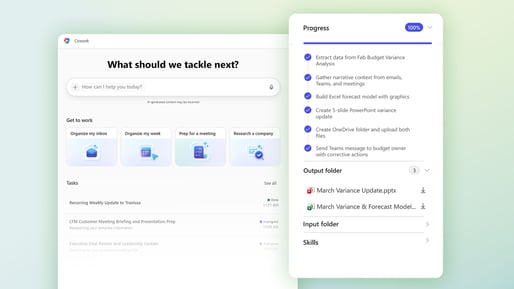
Copilot Cowork is the newer, more ambitious sibling. Microsoft made it generally available worldwide on 16 June 2026. Rather than answering one prompt at a time, Cowork takes a longer task ("review last week's audit file, draft the partner summary, schedule the follow-up meetings") and runs it end-to-end across your Microsoft 365 environment. It can send emails, post in Teams, build documents and spreadsheets, schedule meetings and conduct multi-step research, with approval gates before anything sensitive happens.
Claude is Anthropic's AI assistant. You can buy it as a standalone product, but here's the part most firms miss: Claude's models are already running inside the Microsoft stack. Claude Opus 4.8 and Sonnet 4.6 currently power Copilot Cowork, Claude is selectable in Copilot Chat and Researcher, and it's available in Copilot Studio for building agents.
So, when someone asks "should we buy Claude?" the better question is usually "are we already using Claude through the Copilot licence we've paid for?"
Which tool for which job?
A useful way to think about it:
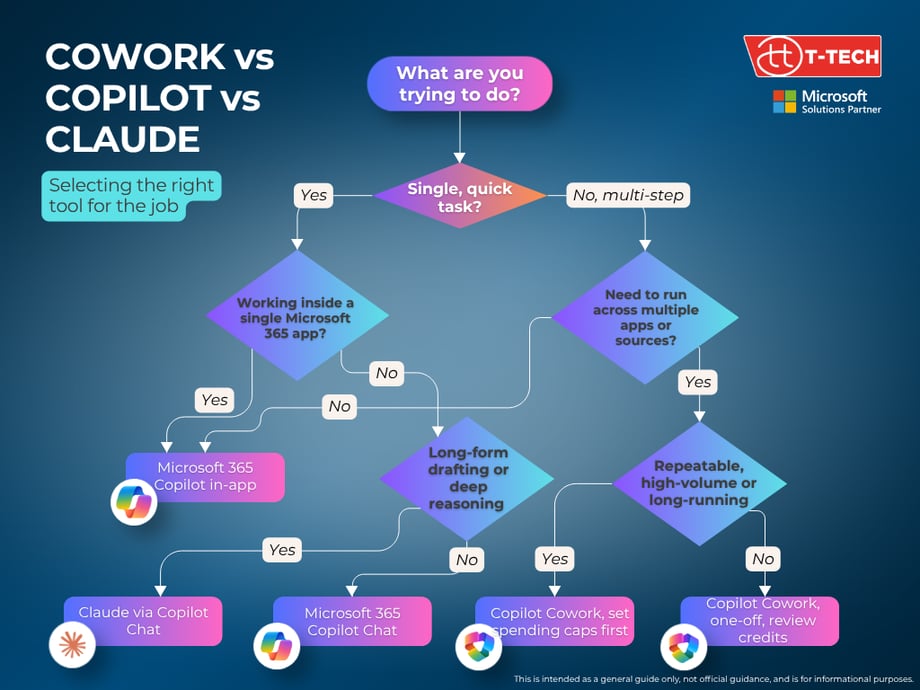
Use Microsoft 365 Copilot for:
- Summarising emails, meetings and documents
- Drafting client letters, internal comms and engagement updates
- Building first-cut spreadsheets or decks inside the Office apps
- Answering questions grounded in your SharePoint, Teams and Outlook data
This is the day-to-day workhorse. The cost is fixed and the value is broad.
Use Copilot Cowork for:
- Longer, multi-step work you'd usually delegate to a junior
- Cross-app tasks like "compare these client files, draft the variance memo and circulate it"
- Recurring routines such as Monday-morning prep, weekly pipeline reports or month-end pack assembly
- Heavier research jobs that pull from emails, meetings, files and the web in one go
Cowork is designed for jobs that previously needed a person to sit down for an hour or more. It runs server-side, so it carries on after you close your laptop.
Use Claude (inside Copilot) for:
- Long-form drafting where tone and nuance matter, such as client communications or thought leadership
- Complex reasoning over large documents, for example multi-page contracts or audit working papers
- Tasks where you want a second opinion alongside the default OpenAI model
For most firms, you don't need a separate Claude licence to access this. You need to make sure your admin has enabled Anthropic models in the Microsoft 365 admin centre.
What Cowork actually costs
This is where senior leaders need to pay attention.
Cowork still requires a Microsoft 365 Copilot licence (around $30 per user per month for enterprise) as the foundation. Cowork usage is then billed separately, in Copilot Credits priced at $0.01 per credit under pay-as-you-go, with a discounted P3 option if you commit to volume up front.
Microsoft groups tasks into three rough tiers:
|
Task type |
Approx. credits |
Example |
|
Light |
100 to 300 |
Sort an inbox, summarise a meeting |
|
Medium |
400 to 700 |
Multi-source briefing with two outputs |
|
Heavy |
700+ |
Aggregate dozens of files, build a model and a deck |
Cost depends on four things: the model used, how much organisational data is retrieved, how many tools are called, and how long the task runs.
The good news for governance:
- Cowork is off by default
- Admins enable Cowork by turning on usage-based billing and creating a spending policy scoped to all users or specific groups.
- Spending caps and alerts can be set at tenant and group level, with user-level controls also supported
- Frontier preview users get a grace period until 1 July 2026 before billing kicks in
Getting the best return for your tech spend
A sensible order of play:
- Get value from the Copilot licence you already pay for. Most firms are using a fraction of what's available, including the Claude models now selectable inside Chat and Researcher.
- Identify two or three Cowork use cases before turning it on. Pick repeatable, high-volume jobs where the time saved is measurable, such as audit file comparisons, monthly client packs or partner briefings.
- Set spending caps before anyone runs a task. Treat Copilot Credits like any other consumption-based cloud cost.
- Train people on when to delegate to Cowork versus when to prompt Copilot. It's a different skill and getting it wrong is what makes the bill creep up.
If you'd like a hand mapping these tools to specific use cases in your firm, or modelling what Cowork might cost based on your team's actual workload, our experts can walk you through it. Get in touch with the T-Tech team for a conversation.
Live Cowork webinar
T-Tech hosted a live webinar where we showed you how to get the most from Cowork, when to use it and demonstrations of live, real-world use cases of Cowork in action.

To find out what we discovered, and to view the recording, head over to this blog post